

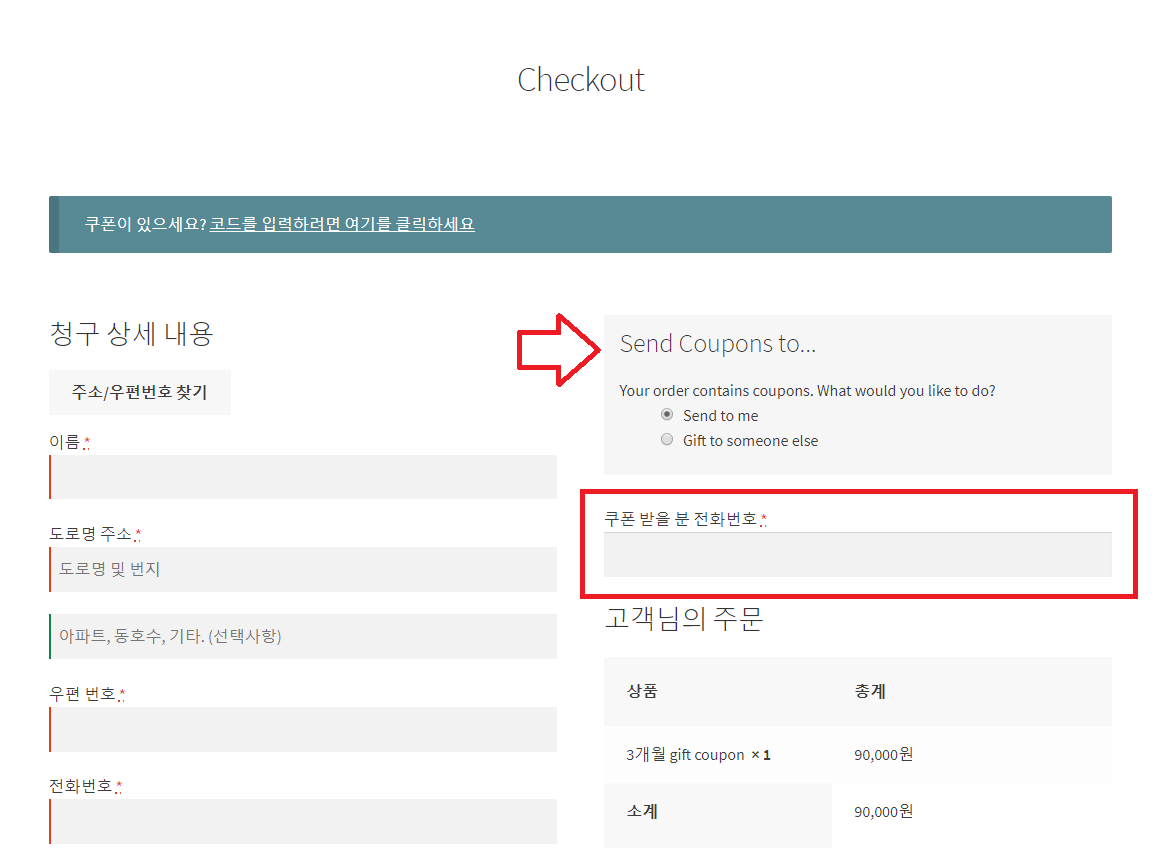
상황 : woocommerce smart coupons 로 기프트 카드를 상품으로 만들었을 때, 메일 외 알림 문자 등을 전송할 수 있도록 연락처를 받기 위해 필드를 추가
처리 : 결제 화면에서 주문이 될 상품 중에 기프트 카드 상품 카테고리 내 상품이 있을 경우, 필드를 노출. 입력된 값을 주문 메타 정보에 저장을 하고, 메일과 어드민 주문 편집에도 노출을 하기
/* -----------------------------------------------------------------------------------------
 * 결제 아이템 중에 쿠폰(기프트카드) 상품이 있는 경우, 추가 필드를 노출. 이후 각종 정보에 표시 - checkout addons 대체
 */
// 조건에 맞을 때 노출하고 싶은 필드를 미리 준비. 필드를 조건 비교하지 않으면, 밸리데이션 과정에서 필수 항목으로 인식을 해 버림!
function ok3_custom_checkout_fields($fields){
  $cat_in_cart = false;

  // Loop through all products in the Cart
  foreach ( WC()->cart->get_cart() as $cart_item_key => $cart_item ) {
    // If Cart has category "coupons", set $cat_in_cart to true
    if ( has_term( 'coupons', 'product_cat', $cart_item['product_id'] ) ) {
      $cat_in_cart = true;
      break;
    }
  }
  if ( $cat_in_cart ) {
    $fields['ok3_extra_fields'] = array(
        'ok3_text_field' => array(
          'type' => 'text',
          'required'      => true,
          'label' => __( '쿠폰 받을 분 전화번호' )
          ),
        );
  }
    return $fields;
}

// 미리 지정한 카테고리에 해당하는 상품이 현재 체크아웃 아이템 목록에 있다면 추가 정보 입력 필드를 화면에 표시
add_filter( 'woocommerce_checkout_fields', 'ok3_custom_checkout_fields' );
function ok3_extra_checkout_fields(){
    $checkout = WC()->checkout();
  // Set $cat_in_cart to false
  $cat_in_cart = false;

  // Loop through all products in the Cart
  foreach ( WC()->cart->get_cart() as $cart_item_key => $cart_item ) {
    // If Cart has category "coupons", set $cat_in_cart to true
    if ( has_term( 'coupons', 'product_cat', $cart_item['product_id'] ) ) {
      $cat_in_cart = true;
      break;
    }
  }
  if ( $cat_in_cart ) {   ?>
    <div class="checkout-extra-fields">
    <div><?php //  _e( '쿠폰 받을 전화번호' ); ?></div>
    <?php
       foreach ( $checkout->checkout_fields['ok3_extra_fields'] as $key => $field ) : ?>
        <?php woocommerce_form_field( $key, $field, $checkout->get_value( $key ) ); ?>
      <?php endforeach; ?>
    </div>
<?php
  }
}
add_action( 'woocommerce_checkout_after_customer_details' ,'ok3_extra_checkout_fields' );

// 추가한 필드가 화면에 표시되어 있다면, 주문 메타 정보로 입력값을 저장
function ok3_save_extra_checkout_fields( $order_id, $posted ){
    // don't forget appropriate sanitization if you are using a different field type
    if( isset( $posted['ok3_text_field'] ) ) {
        update_post_meta( $order_id, '_ok3_text_field', sanitize_text_field( $posted['ok3_text_field'] ) );
    }
}
add_action( 'woocommerce_checkout_update_order_meta', 'ok3_save_extra_checkout_fields', 10, 2 );

// 주문 접수 성공 시(thankyou page), 내계정 > 주문 상세 보기에서 추가된 필드의 정보를 표시
function ok3_display_order_data( $order_id ){
//	$cat_in_order_items = false;
  $order = wc_get_order( $order_id );

  if (oks_check_order_items_in_cat('coupons', $order)) {   ?>
    <section class="woocommerce-customer-details extra-info">
    <h2 class="woocommerce-column__title" style="margin-top:50px;"><?php _e( '추가 정보' ); ?></h2>
    <table class="shop_table shop_table_responsive additional_info">
      <tbody>
        <tr>
          <th><?php _e( '쿠폰 받을 분 전화번호:' ); ?></th>
          <td><?php echo get_post_meta( $order_id, '_ok3_text_field', true ); ?></td>
        </tr>
      </tbody>
    </table>
    </div>
<?php
  }
}
add_action( 'woocommerce_thankyou', 'ok3_display_order_data', 10 );
add_action( 'woocommerce_view_order', 'ok3_display_order_data', 10 );

// 어드민 > 주문 상세 정보 하단에 추가 필드에 대한 메타 정보 표시. (※div class를 address로 쓴 것은 기존 정의된 스타일을 쓰기 위함)
add_action( 'woocommerce_admin_order_data_after_order_details', 'ok3_display_order_data_in_admin' );
function ok3_display_order_data_in_admin( $order ){
  if (oks_check_order_items_in_cat('coupons', $order)) {   ?>
    <div class="order_data_column">
      <h4><?php _e( '추가 정보', 'woocommerce' ); ?></h4>
      <div class="address">
      <?php
        echo '<p><strong>' . __( '쿠폰 받을 분 전화번호' ) . ':</strong>' . get_post_meta( $order->id, '_ok3_text_field', true ) . '</p>';
   ?>
      </div>
    </div>
<?php
  }
}

// 메일 > 주문 목록 테이블 아래, 추가 필드에 대한 메타 정보를 추가함
add_filter('woocommerce_email_order_meta_fields', 'ok3_email_order_meta_fields', 1, 3 );
function ok3_email_order_meta_fields( $fields, $sent_to_admin, $order ) {
  if (oks_check_order_items_in_cat('coupons', $order)) {
    $fields['coupon_receiver_phone'] = array(
          'label' => __( '쿠폰 받을 분 전화번호:' ),
          'value' => get_post_meta( $order->id, '_ok3_text_field', true ),
        );
  }
    return $fields;
}

// 메일 > 고객 정보 하단(주소 표시 아래). 추가 필드 정보 표시 (※ 위와 같이 쓰면 중복 표시가 되어서 뺌)
// add_action('woocommerce_email_customer_details', 'ok3_show_email_order_meta', 30, 3 );
function ok3_show_email_order_meta( $order, $sent_to_admin, $plain_text ) {
  if (oks_check_order_items_in_cat('coupons', $order)) {
    $ok3_text_field = get_post_meta( $order->id, '_ok3_text_field', true );
    if( $plain_text ){
      echo '쿠폰 받을 분 전화번호: ' . $ok3_text_field;
    } else {
      echo '<p>쿠폰 받을 분 전화번호: ' . $ok3_text_field. '</p>';
    }
  }
}

// 필드 밸리데이션 메시지를 추가하고 싶을 때
// add_action('woocommerce_checkout_process', 'ok3_check_if_additional_field_is_empty');
function ok3_check_if_additional_field_is_empty() {
  // you can add any custom validations here
  if ( empty( $_POST['ok3_text_field'] ) )
    wc_add_notice( 'Please select your preferred contact method.', 'error' );
}

// 위에서 반복 입력되는 비교문을 함수로
function oks_check_order_items_in_cat($cat_slug, $order) {
  $items = $order->get_items();
  foreach ( $items as $item ) {
    $product_id = $item->get_product_id();
    if ( has_term( $cat_slug, 'product_cat', $product_id ) ) {
      return true;
      break;
    }
  }
  return false;
}